GTA 6 Launch Trailer Recreated in GTA 5: What It Means for Clips
A fan recreated the GTA 6 launch trailer in GTA 5 shot by shot. The visual gap is striking, and it changes what you can show in clips.
A fan recreated the GTA 6 launch trailer shot by shot inside GTA 5, and the comparison has gone viral. Here is what the difference means for your clips when the game launches on November 19, 2026.
Why the comparison matters
The recreation, made by GearOS Plays, matched locations and camera angles from the GTA 6 launch trailer using GTA 5. Viewers immediately noticed the difference in lighting, detail and realism. Ned Luke, who played Michael in GTA 5, said in a YouTube video that people claiming the games look the same are "out of their minds" and that "the technology has grown by leaps and bounds."
The gap is not just about graphics. It is about what you can show in a clip. GTA 6's improved visuals, including details like the sweat system and the lighting shown in the trailer, give you more to work with. A chase at sunset or a character's expression will look better in your clips than the same moment in GTA 5.
What this means for your clips
1. Detail shows up in short clips. Viewers notice the difference fast.
2. Vertical clips benefit most. A close-up of a character or a car interior will hold up in vertical format.
3. Compression matters more. Start with a clean recording. See GTA 6 PS5 Capture Settings: 4K WebM vs 1080p MP4 for what to pick.
4. Lighting and time of day stand out. Plan your recording times to capture the best visuals.
How to capture the detail
Record at the highest quality your console allows. PS5 can record up to 4K WebM on the internal drive. Xbox Series X|S records 4K HDR clips up to 30 seconds on the internal drive, or up to 60 minutes on an external drive. See How to Record and Clip GTA 6 on PS5 and How to Record and Clip GTA 6 on Xbox Series X|S.
Turn off the radio for key moments. Licensed music in GTA 6 can be claimed by the music owner, not by Rockstar. A YouTube Short longer than 1 minute with any Content ID claim is blocked worldwide. Keep Shorts at 60 seconds or less, or turn the radio down when you record. See GTA 6 Radio Music and Copyright Claims: Keep Your Clips Online.
Use the PS App or Xbox network for quick transfers. PS5 auto-uploads clips under 3 minutes at 1080p or lower when the console is in rest mode. Xbox uploads to the Xbox network cloud, where captures are kept for 90 days. Both are faster than USB for short clips. See PS5 Auto-Upload for GTA 6 Clips: What Works, What Doesn't.
Clipping with the detail in mind
When you cut clips in ViceForge, the AI picks moments based on action, kills, chases, crashes and big reactions. GTA 6's detail means those moments will look better than the same moments in GTA 5, but the clip still needs to be short and focused.
Pick the GTA game profile in AI Gaming mode, choose your clip length (up to 60 seconds on Gamer Pro, 90 seconds on Creator Pro, 2 minutes on Creator Elite), and the AI will find the peaks. You can edit or remove any clip before downloading.
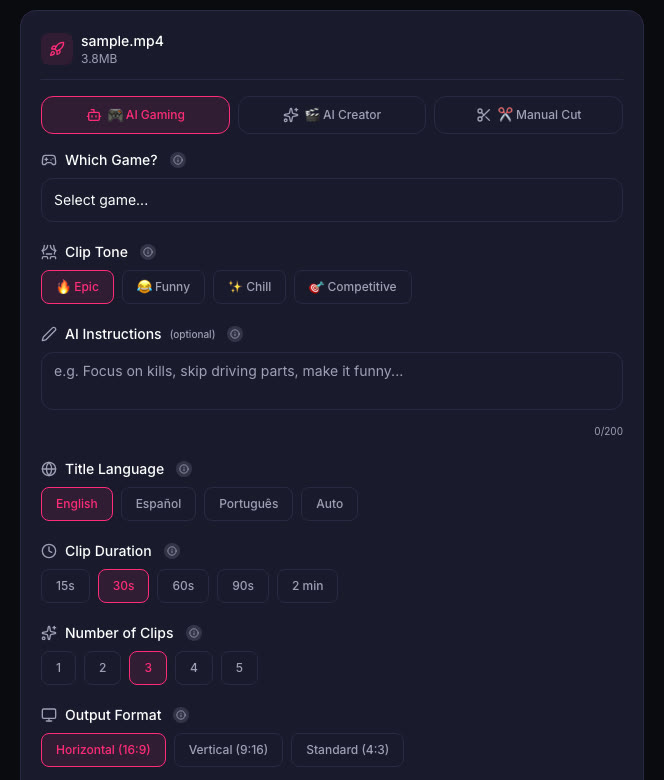
Vertical output with facecam detection keeps your webcam overlay visible when the clip reframes to 9:16. Captions are added automatically, and you can pick from 5 caption styles on paid plans.
Quick checklist
- Record at the highest quality your console allows (4K WebM on PS5, 4K HDR on Xbox internal drive).
- Turn the radio down or off for clips you plan to post as Shorts.
- Keep Shorts at 60 seconds or less to avoid worldwide blocks from music claims.
- Use the PS App or Xbox network for fast transfers of short clips.
- Plan recording times around lighting and weather for the best visuals.
- Cut clips with AI Gaming mode in ViceForge, pick the GTA game profile, and choose vertical output to keep your facecam in frame.
Sources
- Dexerto: GTA 6 launch trailer recreated in GTA 5
- PlayStation Store: Grand Theft Auto VI
- YouTube Help: Shorts longer than 1 minute and Content ID
Written with AI assistance, then fact-checked and edited by Predrag Mitrovic.
Turn your next stream into Shorts
Upload a VOD or gameplay recording and ViceForge finds the best moments, cuts vertical clips and adds captions.
Clip a video with ViceForgeMore from GTA 6 News
GTA 6 Leaks and Your Channel: Why Leaked Footage Is a Risk
Take-Two has been taking down leaked GTA 6 gameplay. Here is why leak clips put your channel at risk and what to prepare before November 19.
GTA 6 Launch Trailer: Story Moments and What to Clip
The GTA 6 launch trailer shows intimate character moments and action. Here's what streamers should watch for and how to clip it.
GTA 6 Launch Trailer: 33 Details and What to Clip When You Play
Jason's military past, Lucia's grenade launcher, and heist setups. Here is what to look for in your gameplay and how to frame your clips.