GTA 6 Sweat System: How to Capture the Detail in Your Clips
Rockstar built a scripted sweat system for GTA 6 that changes based on effort. Here's how to record it and keep it visible in your clips.
Bloomberg reporter Jason Schreier confirmed that characters exert different amounts of sweat depending on the effort they put into an activity. For streamers and clip creators, this means your gameplay footage will capture another layer of detail.
What the sweat system does
If Lucia dances hard in a nightclub, she sweats more than if she dances casually. If Jason works out harder, he sweats more. Rockstar told Schreier the system works for Jason and Lucia, and it sounds like it may apply to other characters too.
The August 27 Extended Look trailer may have already shown it: Lucia dancing in a nightclub with a glisten on her skin.
Why it matters for clips
1. Longer clips capture more. Record longer to give the system time to show variation across different activities.
2. Nightclub and gym footage has more personality. Consider recording workout montages or nightclub scenes to capture this detail.
3. Close-up facecam reactions pair well with in-game detail. Position your facecam so it does not block the character's face or upper body.
4. It is a talking point. Point out the sweat in your commentary or in the clip title.
How to capture it
Record long enough to give the system time to show variation. The sources do not specify exactly when or how much sweat appears, only that it varies with effort.
PS5 capture: Use the Create button to save the last 15 seconds to 1 hour, or start a new recording up to 1 hour. 4K WebM files do not auto-upload to the PS App, so if you want to edit on your phone, use 1080p MP4 or copy 4K files to USB. See GTA 6 PS5 Capture Settings: 4K WebM vs 1080p MP4.
Xbox capture: Hold the Share button to record what happened, up to 30 seconds in 4K HDR on the internal drive or up to 60 minutes on an external drive. Clips auto-upload to OneDrive if you turn it on in Settings > Preferences > Capture & share.
Capture card: Turn off HDCP in the PS5 HDMI settings. Record at 1080p60 or 4K60 depending on your card. Long recordings give you more footage to choose from when you cut clips.
Cutting clips with the detail in frame
When you cut a clip, keep the character's face and upper body in frame so the detail stays visible.
In ViceForge, pick the GTA game profile under AI Gaming and choose Vertical (9:16) if you want to post to YouTube Shorts, Instagram Reels or TikTok. The facecam detection keeps your webcam overlay visible, and the crop reframes to keep the character in the shot.
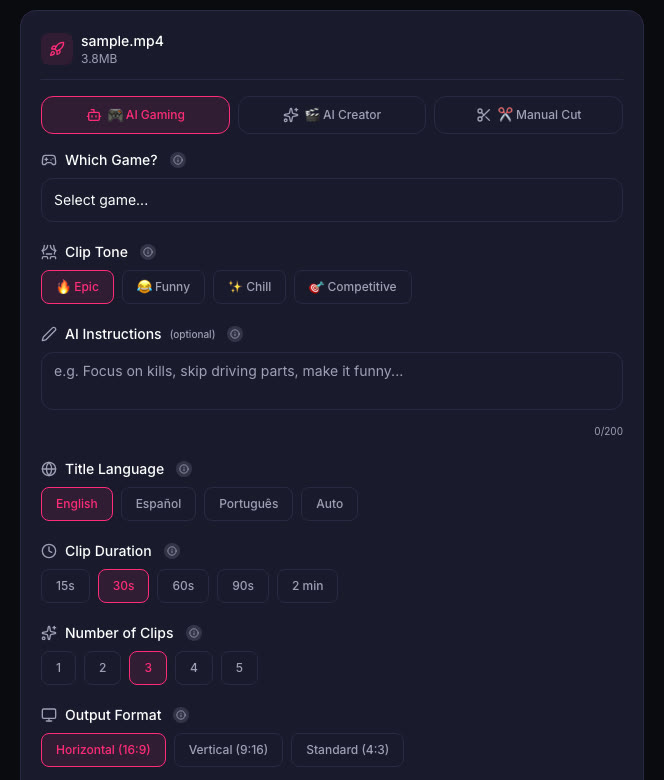
After the AI cuts the clips, you can edit each one before downloading. If a clip does not show the detail clearly, trim the start or adjust the crop in the editor.
Why Rockstar built it
The sweat system is one example of the level of detail in GTA 6. Rockstar set up a new studio in Los Angeles with writers, producers and directors just to make NPCs. The game took eight years of full development and cost more than any video game ever made, though not the rumored $1.5 billion.
This level of detail is why GTA 6 was delayed multiple times. Rockstar's goal was video game perfection, and the sweat system shows what that means in practice.
Quick checklist
- Capture 60 seconds or more of high-effort gameplay: chases, fights, workouts, dancing.
- Keep the character's face and upper body in frame when you cut clips.
- Use Vertical (9:16) for Shorts and Reels, and make sure the crop does not cut off the face.
- Point out the sweat detail in your commentary or in the clip title.
Sources
Written with AI assistance, then fact-checked and edited by Predrag Mitrovic.
Turn your next stream into Shorts
Upload a VOD or gameplay recording and ViceForge finds the best moments, cuts vertical clips and adds captions.
Clip a video with ViceForgeMore from GTA 6 News

GTA 6 Leaks and Your Channel: Why Leaked Footage Is a Risk
Take-Two has been taking down leaked GTA 6 gameplay. Here is why leak clips put your channel at risk and what to prepare before November 19.
GTA 6 Launch Trailer Recreated in GTA 5: What It Means for Clips
A fan recreated the GTA 6 launch trailer in GTA 5 shot by shot. The visual gap is striking, and it changes what you can show in clips.

GTA 6 Launch Trailer: Story Moments and What to Clip
The GTA 6 launch trailer shows intimate character moments and action. Here's what streamers should watch for and how to clip it.