Report: GTA 6 Review Codes Out, Reviews Drop November 18
Insider Gaming reports GTA 6 reviews go live November 18, one day before launch. Here's how to plan your coverage and handle spoilers.
Insider Gaming reports that Rockstar has sent GTA 6 review codes to media outlets and that reviews will go live on November 18, 2026, one day before the game's November 19 launch. The outlet says it independently verified the date after leaker NateTheHate first shared it. Rockstar has not confirmed the embargo date. Review codes reportedly went out at the end of October 2026, giving critics three to four weeks with the game.
November 18 is the day before launch. Reviews will be available before players decide whether to buy on day one.
What this means for streamers
1. Spoilers will be everywhere on November 18. If you want to go in blind, avoid social media and YouTube on that day.
2. Your launch coverage starts on November 19. Pre-load opens on November 12, but you cannot play until November 19. Plan your content strategy around the launch window.
3. Plan your first clips now. Decide what you will record first: the opening, a specific mission, free roam, or a challenge. Knowing your plan means you can start clipping as soon as you play.
How to handle spoilers in your clips
1. Be clear about spoilers in titles and thumbnails. If your clip shows a story moment, say so. "GTA 6 Mission 3 Spoilers" is clear. "This mission is insane" is not.
2. Use spoiler tags on platforms that support them. Add a spoiler warning in your video description or put it in the title where platforms do not offer a dedicated flag.
3. Avoid story clips in the first week if you want spoiler-free viewers. Gameplay, chases, crashes, and funny moments work without revealing the plot.
4. Check what reviews reveal. If a review describes a mission or character, that detail is public. You can reference it without a spoiler tag. If you recorded something not in reviews, tag it.
See GTA 6 Spoilers on Stream: Titles, Clips and Tags for more.
Quick checklist
- Now: Decide what you will play and clip first.
- November 12: Consider pre-loading if you want to play immediately at launch.
- November 18: Avoid reviews if you want no spoilers.
- November 19: Record, clip, and post your content.
- First week: Be clear about spoilers in your titles and thumbnails.
Clips from your first session
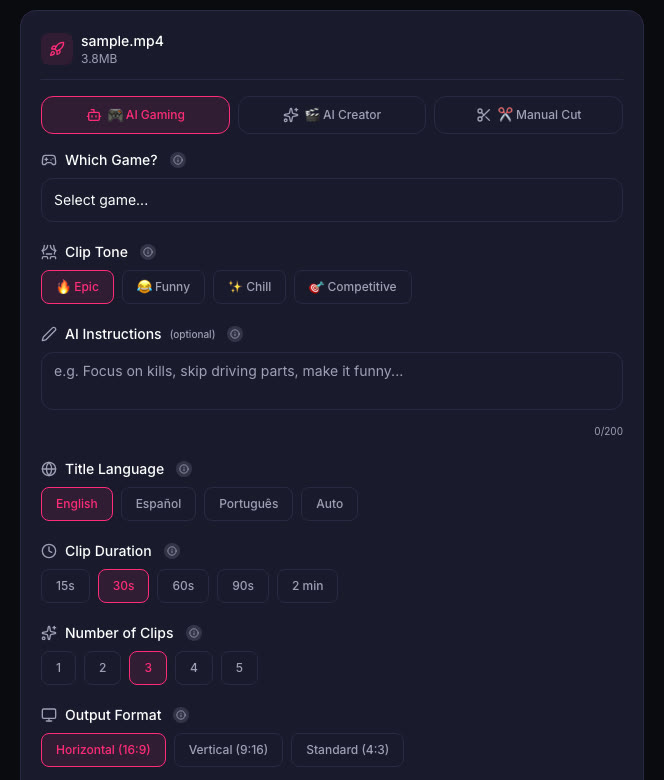
When you start playing on November 19, record your session and cut clips from it. ViceForge has a GTA game profile in AI Gaming mode that finds action, kills, chases, crashes, and big reactions. You pick the clip length, tone, and number of clips, and the AI ranks them by score so you post the best one first.
If you are streaming, download your VOD and upload it to cut clips. See How to Download Your Twitch VODs Before They Expire and How to Make a GTA 6 Funny Moments Compilation from Your VODs.
What Rockstar says
Rockstar's general policy allows occasional, non-commercial use of its games in videos, asks creators not to post isolated cutscenes or leaked material, and keeps the right to remove content. It does not spell out monetization of GTA 6 videos. See Can You Monetize GTA 6 Clips on YouTube?.
Sources
Written with AI assistance, then fact-checked and edited by Predrag Mitrovic.
Turn your next stream into Shorts
Upload a VOD or gameplay recording and ViceForge finds the best moments, cuts vertical clips and adds captions.
Clip a video with ViceForgeMore from GTA 6 News
Rockstar Union Vote Starts November 12, Same Day as GTA 6 Pre-Load
UK Rockstar developers vote on unionization November 12-26. The vote covers pay, overtime, AI policies and runs through GTA 6 launch week.
Virgin Media Pays $891 to Play GTA 6: How to Enter
Virgin Media Ireland is running a competition to pay one gamer to play GTA 6 for eight hours and post a review. Here is how to enter, what the job requires, and how streamers can use it for content.
GTA 6 is 210GB on PS5: Clear Your Drive Before November 12
GTA 6 requires 210GB on PS5 according to PlayStation Store data. Pre-load starts November 12, one week before launch. Here's what to delete now.