How to Make a GTA 6 Funny Moments Compilation from Your VODs
Funny moments videos are a classic GTA format. How to collect moments across a week of streams, keep the pace up, avoid claims, and reuse the same moments as Shorts.
Funny moments compilations have been a GTA staple on YouTube for over a decade, and GTA VI will bring a new wave of them. The format is simple, but making one by hand is slow: you need to find the moments in hours of footage. Here is a workflow that gets you a compilation and a week of Shorts from the same streams.
Step 1: Keep your VODs
You cannot compile what you do not have.
- Twitch: turn on "Store past broadcasts" in Creator Dashboard > Settings > Stream > VOD Settings. VODs stay 7 days for most accounts, 14 for Affiliates and 60 for Partners, Prime and Turbo.
- Download each VOD you want to use: Creator Dashboard > Content > Video Producer > three dots > Download.
- Console recordings: save moments with the Create button (PS5) or by holding Share (Xbox), and copy them to a USB drive.
Note that a VOD with muted music downloads muted. There is no unmuted copy.
Step 2: Find the moments
This is the slow part. A week of streaming is 15 to 30 hours of footage.
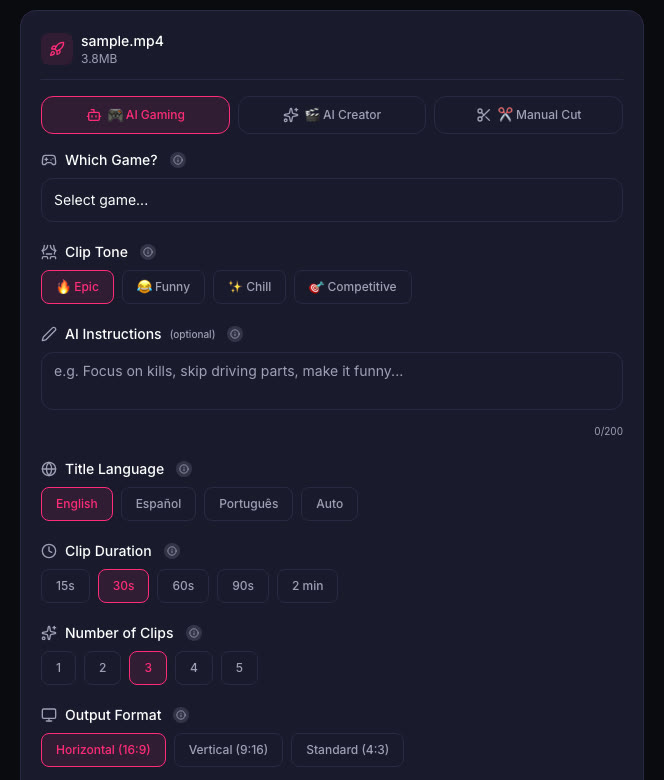
Instead of scrubbing by hand, upload each VOD to ViceForge and choose AI Gaming. The AI looks for action, sound peaks and your reactions, then cuts clips. For a compilation, choose Horizontal (16:9) output. For Shorts, choose Vertical (9:16). You can run the same VOD twice, once in each format.
Step 3: Build the compilation
- Lead with your best moment. The first 30 seconds decide if people stay.
- Keep each moment short. Cut the setup, keep the punchline.
- Vary the rhythm. Crash, chat moment, glitch, fail.
- End with a strong one and a reason to watch the next video.
- 8 to 12 minutes is a common length for this format.
Step 4: Avoid claims
- Radio off, or cut the parts with music. GTA radio is licensed music that can be claimed on YouTube.
- No raw cutscenes. Rockstar's policy asks creators not to post isolated cutscenes.
- Add commentary. Your voice and reactions make it your content.
Step 5: Reuse the moments as Shorts
Every moment in the compilation can also be a Short. Post 1 to 3 a day during the week, then release the compilation at the end of the week and link it from the Shorts. Keep each Short at 60 seconds or less, since on YouTube a Short longer than a minute with any claim is blocked worldwide.
Quick checklist
- VOD storage on, download before expiry.
- Let the AI find the moments.
- Horizontal for the compilation, vertical for Shorts.
- Best moment first, 8 to 12 minutes.
- No radio, no cutscenes, add commentary.
Sources
- Twitch Help: Video on demand
- Twitch Help: Copyrighted audio warnings
- YouTube Help: Shorts longer than 1 minute and Content ID
Written with AI assistance, then fact-checked and edited by Predrag Mitrovic.
Turn your next stream into Shorts
Upload a VOD or gameplay recording and ViceForge finds the best moments, cuts vertical clips and adds captions.
Clip a video with ViceForgeMore from GTA 6 News

Can You Monetize GTA 6 Clips on YouTube? What We Know
An honest answer: what YouTube's Partner Program requires, what Rockstar's policy says and does not say, and what reduces your risk with GTA VI clips.
GTA 6 Launch Day Streaming Checklist
Everything to sort out before November 19: pre-load, capture settings, accounts, audio, VOD storage and a plan for clips. One list, in the order you need it.
GTA 6 PS5 Capture Settings: 4K WebM vs 1080p MP4
Which PS5 capture format to pick for GTA VI, and why most players do not need 4K. Auto-upload limits, file handling and what works for Shorts.