Rockstar's Viral Miami Clips Are GTA 6 Gameplay: What to Clip Now
Rockstar posted GTA 6 gameplay so real viewers thought it was filmed in Miami. Here's what the clips show and how to capture similar moments.
Rockstar has been posting GTA 6 gameplay clips that look so real, viewers thought they were filmed in Miami. Now that the game launches in one week, streamers and clip creators should know what these clips show and how to capture similar moments safely.
What Rockstar posted
On November 11, the Instagram account OnlyInDade shared a video of flashy cars parked on Ocean Drive. People walking past, someone on a scooter, a man posing for photos in front of a car. It looked like typical Miami content. Then Rockstar shared it on its official Instagram Story and liked the post. The video is GTA 6 gameplay.
The clip recreates a real video from October, when Rockstar and West Coast Customs paraded custom GTA 6 cars around Miami. The in-game version matches the real footage, down to the same people and the same scooter. Some viewers believe Jason and Lucia are the two people recording the clip from different angles, but the footage is not clear enough to confirm.
This is the second time Rockstar has released gameplay without announcing it first. A few weeks ago, a tiny clip appeared in a South Park episode. Viewers thought it was AI-generated until Rockstar's name showed up in the credits.
Why it matters for clips
When you play GTA 6, try these moments: driving down a busy street, cars lined up, people walking past, the city at golden hour.
The realism also means your clips will stand out more when you add your own voice or reaction. Your commentary, a chase or a crash makes it clearly gameplay and clearly yours.
What to clip on launch day
1. Ocean Drive and Vice Beach. The lighting, the cars, the pedestrians. These are the clips that will get "Is this real?" comments.
2. Custom cars in traffic. Park a flashy car on a busy street, walk around it, record from different angles.
3. First-person driving. The dashboard, the mirrors, the reflections. First-person clips show details that third-person misses.
4. Pedestrians reacting. People taking photos, stopping to look, walking past. The NPC system is part of what makes the game feel real.
5. Your voice over the moment. Commentary, reactions, jokes. Your voice makes a clip yours.
How to capture it
PS5: Press the Create button, then Save Recent Gameplay (up to 1 hour) or Start New Recording. For 4K clips, save to USB from Media Gallery. PS App auto-upload stops at 1080p and only works for videos under 3 minutes. See How to Record and Clip GTA 6 on PS5.
Xbox: Press Share for a screenshot, hold for Record what happened. 4K HDR clips up to 30 seconds on internal drive, up to 60 minutes on external. See How to Record and Clip GTA 6 on Xbox Series X|S.
Capture card: Turn off HDCP in PS5 HDMI settings. Record in 1080p60 or 4K30, save as MP4.
Turn recordings into clips
When you have a long recording, ViceForge finds the best moments and cuts them into clips. Pick the GTA game profile, choose Vertical (9:16) for Shorts or Horizontal (16:9) for YouTube, and set the clip length to 30 to 60 seconds. The AI picks chases, crashes, big reactions and funny lines, and every clip gets captions automatically.
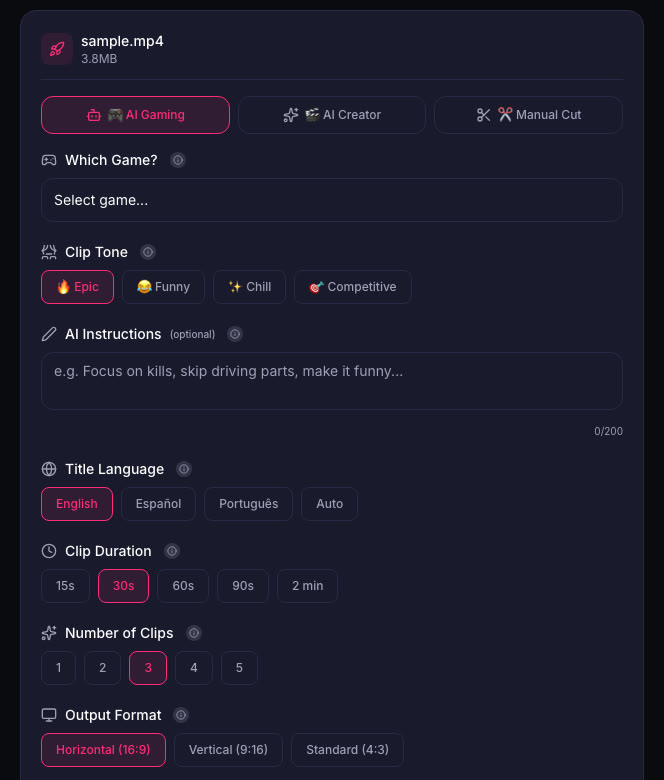
If you stream on YouTube, Stream Clipper (Creator Elite) cuts clips during the stream.
Watch out for radio music
Radio music can be claimed on YouTube or muted on Twitch, even when the gameplay itself is fine. Keep Shorts at 60 seconds or less. A Short longer than 1 minute with any Content ID claim is blocked worldwide. See GTA 6 Radio Music and Copyright Claims: Keep Your Clips Online.
Quick checklist
- Save your best moments right after they happen (PS5 Create, Xbox Share).
- Use first-person for driving clips, third-person for chases.
- Add your voice. Commentary makes a clip yours.
- Keep Shorts at 60 seconds or less to avoid music blocks.
- Turn the radio down or off for key moments.
- Cut clips from your recordings before the VOD expires (Twitch: 7 to 60 days).
Sources
Written with AI assistance, then fact-checked and edited by Predrag Mitrovic.
Turn your next stream into Shorts
Upload a VOD or gameplay recording and ViceForge finds the best moments, cuts vertical clips and adds captions.
Clip a video with ViceForgeMore from GTA 6 News
Burger Shot Expands Across Florida: What Streamers Should Clip
GTA 6's Burger Shot is now at Skinny Louie locations across Florida through December 31. Here's what to clip and how to tie in-game moments to real visits.
GTA 6 Festival Lottery Closes Today: How to Enter for Miami Event
Rockstar is hosting GTA 6: The Festival in Miami on November 21 with Cardi B, Travis Scott and others performing live. You cannot buy a ticket. Entry is through a lottery that closes today at 4:00...
GTA 6 Clips and YouTube Shorts: The 1-Minute Content ID Rule
YouTube blocks Shorts over 1 minute with any Content ID claim. Here's how to keep your GTA 6 clips online when radio music triggers claims.