Burger Shot Expands Across Florida: What Streamers Should Clip
GTA 6's Burger Shot is now at Skinny Louie locations across Florida through December 31. Here's what to clip and how to tie in-game moments to real visits.
GTA 6's fictional fast-food chain Burger Shot is expanding to Skinny Louie restaurants across Florida, and streamers can now tie in-game moments to real-world visits. Here is what to clip, how the promotion works, and what it means for launch week content.
What is happening
From November 13 to December 31, Skinny Louie restaurants across Florida are featuring Burger Shot branding. The stores will have Burger Shot signage, uniforms, and a menu themed after items in the game, according to IGN. The collaboration started at the Kaseya Center in Miami during Miami Heat games last month and is now expanding to standalone locations statewide.
The promotion is limited to Florida locations.
The menu
Skinny Louie's Burger Shot menu includes three items:
- THE BLEEDER, TRIPLE: Three 100% Black Angus smash patties with yellow American cheese, crispy bacon, pickles, BBQ sauce, and ketchup.
- BURGER SHOT, SINGLE: One 100% Black Angus smash patty with yellow American cheese, shredded lettuce, diced raw onions, and Burger Shot sauce.
- BURGER SHOT, DOUBLE: Two 100% Black Angus smash patties with yellow American cheese, shredded lettuce, diced raw onions, and Burger Shot sauce.
What streamers should clip
1. In-game Burger Shot visits. When you stop at a Burger Shot in Vice City, clip the order, the food animation, and any dialogue. These moments connect directly to the real-world promotion.
2. Real-world visits. If you are in Florida, film yourself at a Burger Shot location. Show the signage, the uniforms, and the food. Cut it into a Short that pairs the real meal with your in-game clip.
3. Side-by-side comparisons. Put the in-game Burger Shot next to the real one. Show the menu items, the branding, and how close the real version is to the game.
4. Reactions to the food. Taste the Bleeder Triple on camera, then cut to your character eating the same item in the game. Reactions work well in vertical clips.
5. Launch week tie-ins. The promotion runs through December 31, so you can visit a location after launch and tie it to your first-week gameplay. A "I played GTA 6 then ate at Burger Shot" angle is simple and works.
How to cut the clips
When you record in-game Burger Shot moments, keep clips short. A 30 to 60 second clip that shows the order, the food, and your reaction is enough. If you add real-world footage, cut between the two locations quickly so viewers see the connection right away.
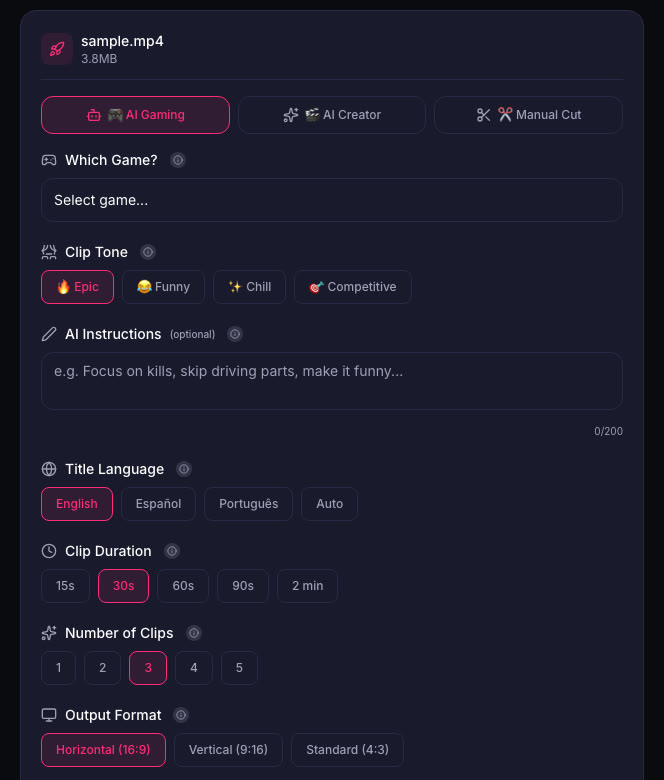
ViceForge can cut your gameplay into clips automatically. Pick the GTA game profile, set the clip length to 30 to 60 seconds, and choose Vertical (9:16) for Shorts. The AI finds action, reactions, and big moments, and you can edit or remove any clip before downloading.
Why this matters
GTA 6 is already the most pre-ordered title in the history of Xbox and PlayStation's digital stores, and analysts estimate the game has generated $1 billion in revenue ahead of launch, according to IGN. A real-world Burger Shot promotion is a chance to create content that connects the game to real life, and that kind of crossover can stand out in a crowded launch week.
Quick checklist
- Clip every Burger Shot visit in Vice City.
- If you are in Florida, visit a real Burger Shot location before December 31.
- Film the signage, the uniforms, and the food.
- Cut a side-by-side comparison of the in-game and real-world versions.
- Keep clips short, 30 to 60 seconds, and use vertical format for Shorts.
- Post the real-world visit as a follow-up to your in-game clip.
Sources
Written with AI assistance, then fact-checked and edited by Predrag Mitrovic.
Turn your next stream into Shorts
Upload a VOD or gameplay recording and ViceForge finds the best moments, cuts vertical clips and adds captions.
Clip a video with ViceForgeMore from GTA 6 News
Rockstar's Viral Miami Clips Are GTA 6 Gameplay: What to Clip Now
Rockstar posted GTA 6 gameplay so real viewers thought it was filmed in Miami. Here's what the clips show and how to capture similar moments.
GTA 6 Festival Lottery Closes Today: How to Enter for Miami Event
Rockstar is hosting GTA 6: The Festival in Miami on November 21 with Cardi B, Travis Scott and others performing live. You cannot buy a ticket. Entry is through a lottery that closes today at 4:00...
GTA 6 Clips and YouTube Shorts: The 1-Minute Content ID Rule
YouTube blocks Shorts over 1 minute with any Content ID claim. Here's how to keep your GTA 6 clips online when radio music triggers claims.