Rockstar Dev on GTA 3's Rough Start: What It Means for Clips
A Rockstar veteran says GTA 3 was "in a sorry state" for most of development. The team kept what was fun, cut what wasn't. Here's what that means for clipping GTA 6.
A Rockstar veteran says GTA 3 was "in a sorry state" for most of development, with crashes, frame rate problems and a map full of holes. The team prioritized fun over story, adding missions that worked and cutting what did not. Here is what that philosophy means when you are hunting for the best moments to clip in GTA 6.
What the dev said
Obbe Vermeij, a Rockstar veteran, marked the 25th anniversary of Grand Theft Auto 3 with a long post on Twitter. He says the game crashed frequently, ran at 20 fps for most of development, and only came together in the last six months. The opening plot with Catalina trying to kill Claude was added late.
The team worked organically. People came up with mission ideas, tried them, and kept the ones that were fun. The story was secondary. Vermeij also says there was not much wastage, other than a multiplayer mode they worked on. Every day something new went in: a mission, radio station, car, pedestrian or building.
The team was small. Vermeij says most people left around 9 or 10 in the evening, even during crunch. He thought it was better to work eight focused hours than spend your life in the office.
GTA 6 is different. Rockstar has thousands of devs now, and the game's development involved conflicting creative visions that stalled the project at times. But the core idea is still there: the game has to be fun to play.
Fun first, story second
That approach is the opposite of what many players expect. GTA 3 put the fun in first, then wrapped a story around it. This focus on playable ideas matters for clip creators.
For clip creators, the fun is the clip. Moments like chases, crashes, jumps, fights, and reactions to things going wrong work on their own without story context.
What it means for GTA 6 clips
When you are clipping GTA 6, look for the moments that work without explanation:
- Action that builds and pays off. Look for chases, jumps, and plans that go sideways.
- Reactions. Record your commentary as you play.
- Physics and chaos. Watch for dramatic moments with vehicles, NPCs, and environmental effects.
- Timing. Focus on close calls and precise moments.
These moments are what Vermeij describes: ideas that were fun when the team tried them.
Quick checklist for clipping GTA 6
- Record everything. See How to Record and Clip GTA 6 on PS5 and How to Record and Clip GTA 6 on Xbox Series X|S.
- Keep clips short. See GTA 6 Radio Music and Copyright Claims for guidance on clip length and music.
- Talk over the gameplay. Your commentary is what makes the clip yours.
- Cut to the action. Start with the build-up, end when the moment is over. No long setup, no wandering after the payoff.
- Check for music. If a radio song is in the clip, trim it or adjust the length accordingly.
How ViceForge helps
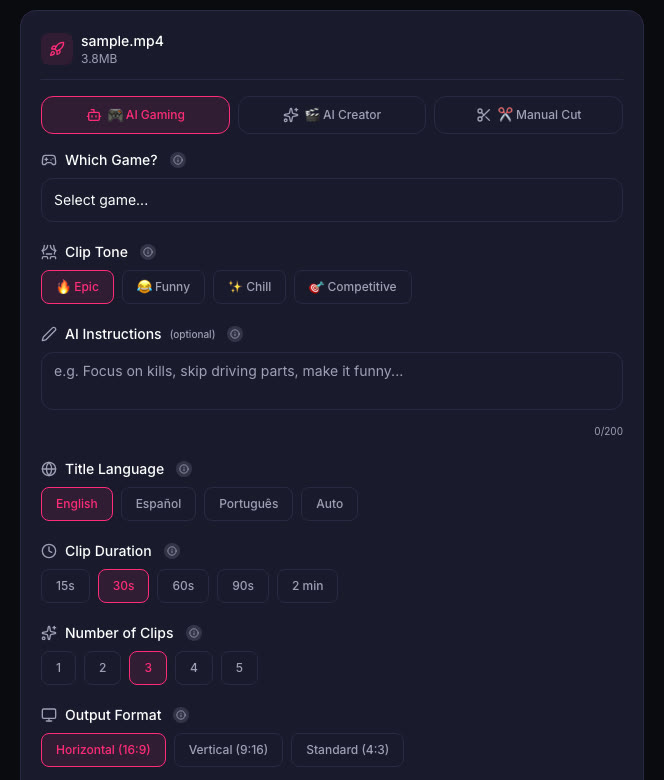
When you upload a GTA 6 recording to ViceForge, the AI Gaming mode finds action, kills, chases, crashes and big reactions. You pick the game profile (GTA, sandbox genre), clip length and output format, and the AI cuts the moments that work on their own.
Every clip gets a score from 0 to 100, ranking the clips from that video. The top clip is marked "Post this first". You can edit or remove any clip before downloading.
The takeaway
GTA 3 was built by trying ideas and keeping what was fun. That is also how you find the best clips. Record your sessions, look for the moments that work without explanation, and cut them fast. The fun is the clip.
Sources
Written with AI assistance, then fact-checked and edited by Predrag Mitrovic.
Turn your next stream into Shorts
Upload a VOD or gameplay recording and ViceForge finds the best moments, cuts vertical clips and adds captions.
Clip a video with ViceForgeMore from GTA 6 News
IGN's 3-Week GTA 6 Giveaway at Best Buy: How to Enter
IGN and Best Buy are giving away TVs, headsets, controllers and more every weekday until November 13. Here's how to enter and what it means for your launch setup.
PS5 Refurb Bundles Drop $40 for GTA 6, Ends November 5
PlayStation cuts $40 off refurbished PS5 bundles with an extra controller. Digital Edition $518, disc $568. Offer ends November 5, 2026.
PS App Auto-Upload Stops at 1080p: Save Your GTA 6 Clips in 4K
PS5's auto-upload to PlayStation App won't send 4K clips. Here's how to save your best GTA 6 moments in full quality with a USB drive.