PS5 Refurb Bundles Drop $40 for GTA 6, Ends November 5
PlayStation cuts $40 off refurbished PS5 bundles with an extra controller. Digital Edition $518, disc $568. Offer ends November 5, 2026.
PlayStation is cutting $40 off refurbished PS5 bundles with an extra controller.
What the bundle includes
Buy a Certified Refurbished PS5 and a Recertified DualSense controller together from PlayStation Direct, and the $40 discount applies automatically at checkout. The Digital Edition bundle costs $518, and the disc edition costs $568. The offer runs until November 5, 2026.
Here is how the savings break down:
- Refurbished PS5 Digital Edition: $499 (down from $599 new)
- Refurbished PS5 Disc Edition: $549 (down from $649 new)
- Recertified DualSense controller: $59 (down from $74 new)
- Bundle discount: $40 off when you buy both
That puts the Digital Edition bundle at $518 instead of $673 if you bought everything new, and the disc edition at $568 instead of $723. You can choose from several DualSense colors, including Sterling Silver and Volcanic Red, which cost $64 instead of $59.
Why refurbished is the best option before GTA 6
The PS5 Pro is unavailable in the lead-up to GTA 6. Refurbished stock from PlayStation Direct offers a lower-cost option. If you play long sessions or couch co-op, having a spare controller means you can charge one while using the other. It also spreads wear across two devices, which helps if you are worried about drift or button issues over time.
Should you wait for Black Friday?
If you want to play GTA 6 on launch day, you need a console by November 19. Pre-loading starts November 12, so ordering now gives you time to set up and test your setup before the game goes live.
Quick checklist
- Order by November 5, 2026 to get the $40 discount.
- Choose Digital Edition ($518) or Disc Edition ($568).
- Pick a second DualSense color if you want one that matches your setup.
- Set up the console and test your capture settings before November 12.
- Turn off HDCP in HDMI settings if you are using a capture card.
Capture and clip setup for GTA 6
Once your PS5 is set up, configure your capture settings before launch day. The PS5 Create button lets you save the last 15 seconds to 1 hour, start a new recording up to 1 hour, or take a screenshot. For GTA 6, set your capture quality to 1080p MP4 if you plan to upload clips quickly, or 4K WebM if you want the highest quality and have time to convert files. See GTA 6 PS5 Capture Settings: 4K WebM vs 1080p MP4.
The PS App auto-uploads videos under 3 minutes at 1080p or lower when your PS5 is in rest mode with internet. 4K videos do not auto-upload, and clips are kept for 14 days. If you record longer sessions, copy them to a USB drive from Media Gallery > More > Copy to USB Drive. See PS5 Auto-Upload for GTA 6 Clips: Limits and Setup.
Turn your GTA 6 recordings into clips
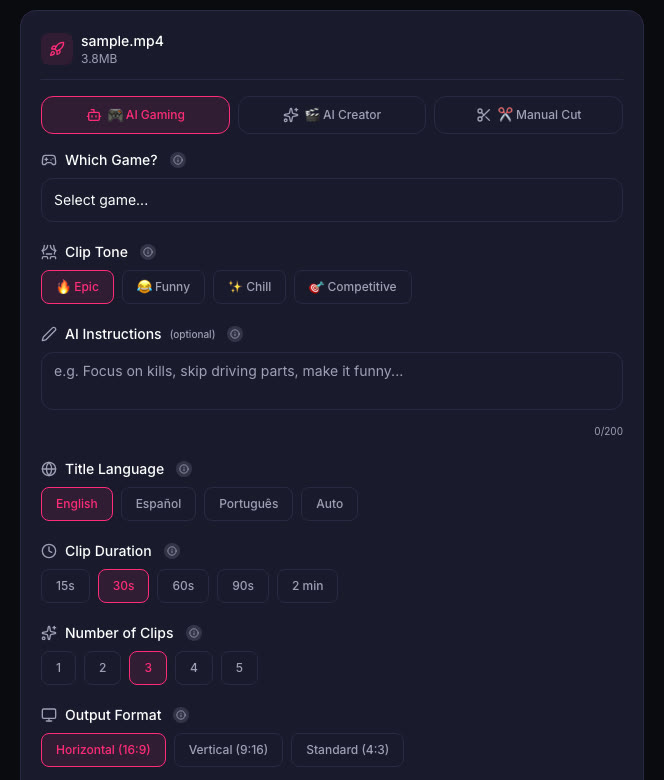
When you have a long recording, ViceForge finds the best moments and cuts them into clips. Pick the GTA game profile and choose your clip length. The AI finds action, kills, chases, crashes and big reactions. Choose your output format (Horizontal, Vertical or Standard), and captions are added automatically.
Sources
- IGN: PS5 Console Bundle Deal Ahead of GTA 6 and Black Friday
- GamesRadar: Sony drops prices on the only PS5 consoles I'd recommend buying this holiday season
- PlayStation Store: Grand Theft Auto VI
- PlayStation Support: Capture PS5 gameplay
Written with AI assistance, then fact-checked and edited by Predrag Mitrovic.
Turn your next stream into Shorts
Upload a VOD or gameplay recording and ViceForge finds the best moments, cuts vertical clips and adds captions.
Clip a video with ViceForgeMore from GTA 6 News
IGN's 3-Week GTA 6 Giveaway at Best Buy: How to Enter
IGN and Best Buy are giving away TVs, headsets, controllers and more every weekday until November 13. Here's how to enter and what it means for your launch setup.
Rockstar Dev on GTA 3's Rough Start: What It Means for Clips
A Rockstar veteran says GTA 3 was "in a sorry state" for most of development. The team kept what was fun, cut what wasn't. Here's what that means for clipping GTA 6.
PS App Auto-Upload Stops at 1080p: Save Your GTA 6 Clips in 4K
PS5's auto-upload to PlayStation App won't send 4K clips. Here's how to save your best GTA 6 moments in full quality with a USB drive.