GTA 6 Launch Trailer: What Streamers Missed
Here is what the trailer shows and how to capture those moments for your audience.
Here is what the trailer shows and how to capture those moments for your audience.
What the trailer shows
The Launch Trailer runs entirely in-game on PS5. The official description says Jason and Lucia are caught in a criminal conspiracy across Leonida after an easy score goes wrong. The trailer shows the two characters in a shower scene, snakes, people eating chicken, and more.
Insider Gaming notes the trailer features new music from Justice, who composed the original score. A standalone single, "Flower in a Hurricane" featuring Tame Impala, SZA and King Gizzard & The Lizard Wizard, is on the official soundtrack album, available to pre-save on streaming services and for pre-order on vinyl or CD at gtavi-thealbum.com.
Moments to clip
Heists. When you play, record the planning phase, the entry, the vault moment and the escape. A clip that opens with the vault door or the alarm and ends with the getaway works well.
Chases. Clip the moment the chase starts, a crash or near-miss, and the end.
Character interactions. Jason and Lucia appear together in tense and intimate scenes. Clip dialogue that reveals their relationship or the conspiracy.
NPC details. Clip funny or strange NPC behaviour.
Vehicles. Clip a stunt, a jump or a crash.
How to capture these moments
PS5 capture. Press the Create button to save the last 15 seconds up to 1 hour, or start a new recording up to 1 hour. Set your capture length in Settings > Captures and Broadcasts > Shortcuts for Create Button. For heists and chases, choose a recording length that captures the full sequence without filling your storage. See How to Record and Clip GTA 6 on PS5.
Xbox capture. Press the Share button for a screenshot, hold it to record what happened. On an external drive you can record up to 60 minutes. For long missions, start a recording manually. See How to Record and Clip GTA 6 on Xbox Series X|S.
Stream and clip later. If you stream on Twitch or YouTube, download your VOD and cut clips from it. Twitch VODs expire after 7 to 60 days depending on your status. See How to Download Your Twitch VODs Before They Expire.
Turn recordings into Shorts
When you upload a recording to ViceForge, pick the GTA game profile under AI Gaming. The AI finds action, kills, chases, crashes and big reactions. Set your clip length to stay under YouTube's one-minute line for Shorts with music. Every clip gets captions automatically, and facecam detection keeps your camera in frame when you export vertical clips.
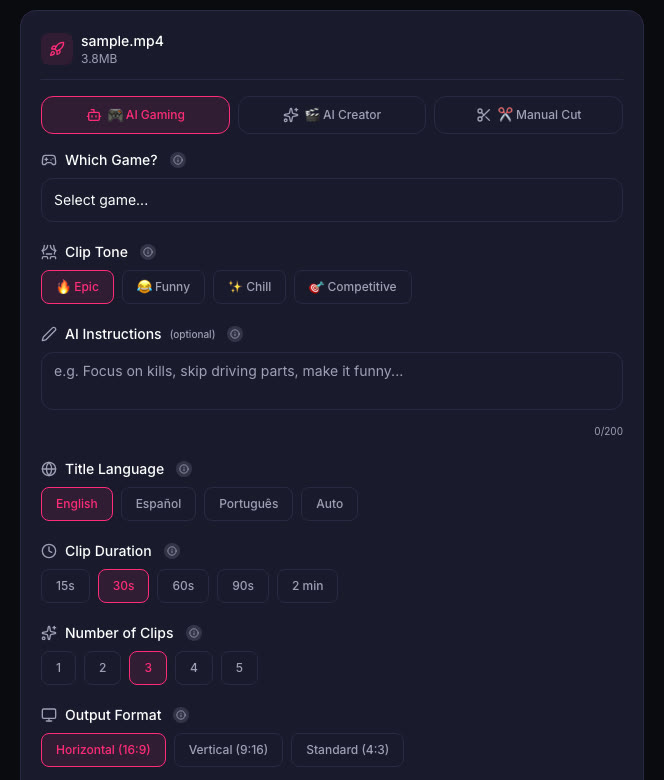
Each clip has a score from 0 to 100 that ranks the moments from your video. The top clip is marked "Post this first". You can edit or remove any clip before downloading.
Quick checklist
- Record heists, chases, character dialogue and NPC moments.
- Keep your clips short enough for Shorts with music.
- Add captions so viewers watch without sound.
- Download your VODs before they expire.
- Post your best clip first, then the rest over the following days.
Watch the radio
When you clip gameplay with the radio on, that music can be claimed on YouTube or muted on Twitch. Turn the radio down or off for key moments, or keep Shorts at 60 seconds or less. A Short longer than 1 minute with any Content ID claim is blocked worldwide on YouTube. See GTA 6 Radio Music and Copyright Claims: Keep Your Clips Online.
Sources
- Insider Gaming: GTA 6 Gameplay Launch Trailer Dropped by Rockstar Games
- PlayStation Store: Grand Theft Auto VI
Written with AI assistance, then fact-checked and edited by Predrag Mitrovic.
Turn your next stream into Shorts
Upload a VOD or gameplay recording and ViceForge finds the best moments, cuts vertical clips and adds captions.
Clip a video with ViceForgeMore from GTA 6 News
GTA 6 Hidden Details: What Devs Added That Even Rockstar Missed
Rockstar gave GTA 6 developers freedom to add features on their own. Not even studio heads know everything in the game. Here's how to find the details first.
PS App Auto-Upload for GTA 6: What Actually Works
PS5's auto-upload feature works for videos under 3 minutes and 1080p or lower. Here is what auto-uploads, what does not, and how to set it up.
GTA 6 Dating System: What Streamers Should Know
6% of British adults in a YouGov poll called dating in a video game cheating. Here is what that means for your GTA 6 stream and clips.