GTA 6 Midnight Black PS5: Launch Day Bundle Strategy for Streamers
Sony's Midnight Black PS5 launches November 19, 2026 with GTA VI, but it's Japan-only at ¥55,000 ($347) and requires a Japanese PlayStation account.
Sony is releasing a Midnight Black PS5 on November 19, 2026, the same day GTA VI launches. The console costs ¥55,000 (approximately $347) and is available only in Japan. Streamers outside Japan cannot buy it through official channels, and the console supports only Japanese as its system language.
What the Midnight Black PS5 includes
The Digital Edition Midnight Black PS5 swaps the white exterior for a black finish that matches Sony's existing Midnight Black accessories. It has the same core features as the standard Digital Edition: 3D audio, support for compatible PS4 games, and the DualSense controller's haptic feedback and adaptive triggers. The console comes with a Midnight Black controller and an 825GB SSD with Astro's Playroom preinstalled.
Because it is a Digital Edition, there is no disc drive. Sony will sell a matching Midnight Black drive separately for ¥11,980 (around $75.78), bringing the total to ¥66,980 (around $424).
Regional restrictions
The Midnight Black PS5 requires a PlayStation account with its country or region set to Japan. This is the same requirement as the existing Japanese-language Digital Edition. Preorders begin at participating Japanese retailers and online stores on October 20.
Sony has not announced plans to release the Midnight Black PS5 in other regions.
What this means for streamers
1. No official path to buy it outside Japan. If you are streaming from the US, Europe or elsewhere, you cannot order the Midnight Black PS5 through Sony. Import services exist, but they add cost and risk.
2. Launch week console scarcity is normal. GTA VI releases on the same day as the Midnight Black PS5 in Japan. Standard PS5 models will be in high demand everywhere. If you plan to stream GTA VI on launch day, order your console now or secure one before November 19.
3. The color does not change performance. The Midnight Black PS5 has the same specs as the white Digital Edition. Your clips will look the same. Viewers care about your gameplay and commentary, not the console color.
4. Plan content around the console, not around getting one. If you are in Japan and can preorder the Midnight Black PS5, an unboxing or setup stream on November 19 is a natural fit. If you are outside Japan, a "launch day console comparison" or "how to get a PS5 for GTA VI" video is more realistic.
Capturing GTA VI clips on PS5
The PS5 Create button lets you save recent gameplay (last 15 seconds up to 1 hour), start a new recording (up to 1 hour), or take a screenshot. You can set presets in the Captures and Broadcasts menu: Standard, Easy Screenshots, or Easy Video Clips.
The PS App auto-uploads videos under 3 minutes at 1080p or lower when your PS5 is in rest mode with internet. Auto-uploaded videos are kept for 14 days. 4K clips do not auto-upload. For 4K, go to Media Gallery, press More, and copy to a USB drive.
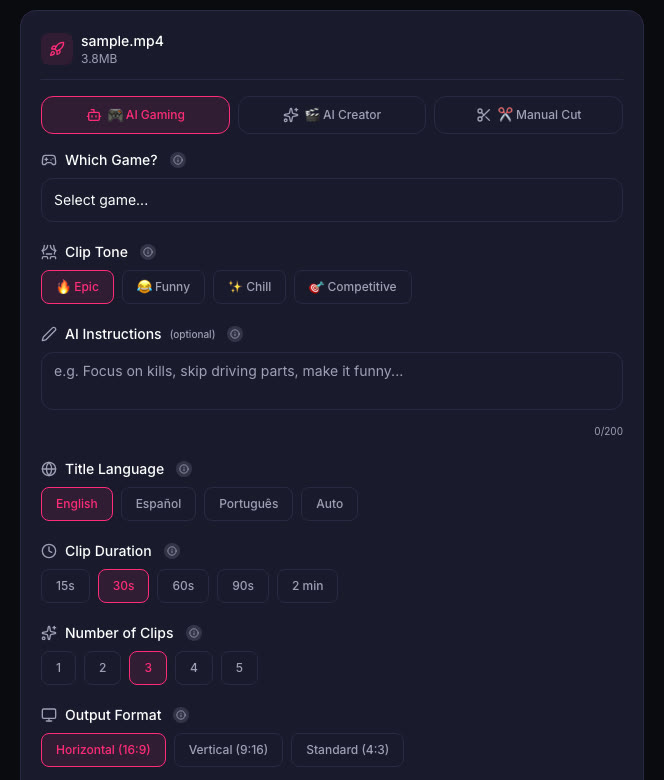
When you have your clips, ViceForge can cut them into short vertical or horizontal clips. Pick the GTA game profile under AI Gaming, and the AI finds action, kills, chases and crashes. Clips are ready with captions and the facecam kept in frame.
Quick checklist
- Order a PS5 now if you do not have one. Launch day stock is unpredictable.
- Set your capture settings before you start playing. Easy Video Clips is the fastest preset.
- Plan your first stream or video around gameplay, not around unboxing a console you cannot buy.
- Keep clips short for Shorts and Reels. 60 seconds or less avoids the Content ID block rule on YouTube.
- Turn the radio down during key moments if you want to avoid music claims. See GTA 6 Radio Music and Copyright Claims.
Sources
Written with AI assistance, then fact-checked and edited by Predrag Mitrovic.
Turn your next stream into Shorts
Upload a VOD or gameplay recording and ViceForge finds the best moments, cuts vertical clips and adds captions.
Clip a video with ViceForgeMore from GTA 6 News
Can You Monetize GTA 6 Clips on YouTube? What We Know
An honest answer: what YouTube's Partner Program requires, what Rockstar's policy says and does not say, and what reduces your risk with GTA VI clips.
How to Make a GTA 6 Funny Moments Compilation from Your VODs
Funny moments videos are a classic GTA format. How to collect moments across a week of streams, keep the pace up, avoid claims, and reuse the same moments as Shorts.
GTA 6 Launch Day Streaming Checklist
Everything to sort out before November 19: pre-load, capture settings, accounts, audio, VOD storage and a plan for clips. One list, in the order you need it.