GTA 6 Peace Treaty: Negotiate Your Launch Month Strategy
A Finnish retailer made a printable peace treaty for GTA 6 launch month. Here's how to plan your streaming window and clip output.
A Finnish retailer launched a "peace treaty" for GTA 6 launch month, and it is not from Rockstar. Gigantti created the Grand Game Deal so players can negotiate uninterrupted gaming time with family or housemates before November 19. The promotion is available only in Finland, though the treaty itself can be accessed in English. Here is what it is, how it works, and what it means for your content calendar.
What the peace treaty is
The Grand Game Deal is a printable agreement between a player and the people they live with. It sets out how much uninterrupted time the player gets with GTA 6 and what they offer in return. The treaty comes in three levels:
- Easy: one full day of uninterrupted gaming on launch day.
- Normal: the entire launch week.
- Hard: a full month.
In exchange, the player agrees to a list of favors. Those can include chores, gifts, or spending time together. Both sides customize the list, sign the treaty, and print it out.
The promotion runs until November 15. Finnish players who sign up get a 10% discount code for gaming products and entry into a prize draw for a PS5 and a copy of GTA 6.
Why it matters for streamers
Many streamers expect high viewer interest during GTA 6's launch month. If you stream part-time or live with others, launch week may turn into a negotiation every evening.
The treaty is a marketing stunt, but the idea is practical. Setting expectations in advance means fewer interruptions when you are live or recording. A printed agreement also makes it easier to say no to last-minute requests without starting an argument.
How to plan your streaming window
1. Pick your window before November 19. Decide whether you want launch day, launch week, or the full month. If you stream evenings only, a week might be enough. If you want to cover the story and build a clip library, a month is better.
2. Write down what you will do in return. Chores, errands, or time together after launch month. The more specific the list, the easier it is to stick to it.
3. Block your calendar. Mark your streaming hours and your off hours. If you promised to cook dinner three times a week, put those days in your calendar now.
4. Communicate with your audience. Let viewers know your schedule in advance. A pinned post or a Discord announcement keeps expectations clear.
5. Plan your clip output. If you are streaming 8 hours a day, you will have more footage than you can edit manually. Decide how many clips you want per day and what length works for your audience.
Quick checklist
- Decide your uninterrupted window: day, week, or month.
- Write a list of what you will do in return.
- Block your streaming hours and off hours in your calendar.
- Announce your schedule to your audience.
- Plan how many clips you want per day.
Clips during launch month
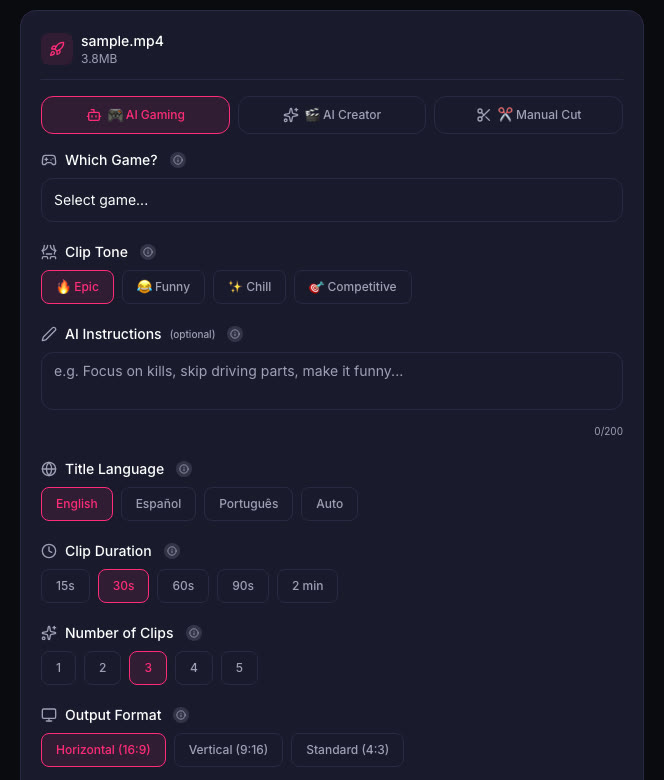
When you are streaming or recording for hours every day, manual editing becomes a bottleneck. ViceForge has a GTA game profile in AI Gaming mode. You upload a recording, pick the game, set the clip length and tone, and the AI finds action moments, kills, chases, and big reactions.
You can set the number of clips and the output format. Vertical (9:16) keeps your facecam in frame, and captions are added automatically. The maximum clip length depends on your plan: 60 seconds on Gamer Pro, 90 seconds on Creator Pro, 2 minutes on Creator Elite.
What Rockstar says
Rockstar's general policy allows occasional, non-commercial use of its games in videos and asks creators not to post isolated cutscenes or leaked material. Monetization of GTA VI videos is not explicitly addressed in the policy. See the PlayStation Store listing for release details.
Sources
- Dexerto: GTA 6 peace treaty promises fans uninterrupted gaming for a whole month
- PlayStation Store: Grand Theft Auto VI
Written with AI assistance, then fact-checked and edited by Predrag Mitrovic.
Turn your next stream into Shorts
Upload a VOD or gameplay recording and ViceForge finds the best moments, cuts vertical clips and adds captions.
Clip a video with ViceForgeMore from GTA 6 News
Can You Monetize GTA 6 Clips on YouTube? What We Know
An honest answer: what YouTube's Partner Program requires, what Rockstar's policy says and does not say, and what reduces your risk with GTA VI clips.
How to Make a GTA 6 Funny Moments Compilation from Your VODs
Funny moments videos are a classic GTA format. How to collect moments across a week of streams, keep the pace up, avoid claims, and reuse the same moments as Shorts.
GTA 6 Launch Day Streaming Checklist
Everything to sort out before November 19: pre-load, capture settings, accounts, audio, VOD storage and a plan for clips. One list, in the order you need it.