Restaurant Denies $12K Streamer Bill After Viewers Hijack QR Code
Zauo Shibuya says it only charged Lacy for what he ate, contradicting his $12,000 claim. Here's how to protect your IRL streams.
A Japanese restaurant has denied charging Twitch streamer Lacy $12,000 after viewers hijacked its ordering system during his October 28 livestream. The restaurant says it only charged him for what he ate. Here is what happened, why it matters for streamers who eat on camera, and how to protect yourself.
What happened
Lacy was streaming from Zauo Shibuya in Japan with his girlfriend Darla Claire when he accidentally showed a QR code used to order food at the table. Viewers scanned it and placed thousands of dollars worth of orders without his permission.
Lacy told his audience the bill reached 1.6 million yen, almost $12,000, and that he paid it. He said he told staff to give the unwanted food to other families.
According to a translated statement shared on X, staff check orders with customers and only charge for items they actually consumed. "Of course, we don't charge customers anything for such items," the restaurant said.
Staff admitted they initially struggled to identify the prank orders and had already cooked some dishes. They discarded some items after confirming the customer had not ordered them. The restaurant pushed back against criticism, saying some accusations were inaccurate.
The clarification directly contradicts Lacy's claim that he paid $12,000. The restaurant has not disclosed how much he paid for his actual meal. This is not Lacy's first controversy. Earlier in 2026, the streamer staged a DoorDash firing after making deliveries using a viewer's account.
Why this matters for streamers
If you stream from a restaurant, be careful about what appears on screen.
The interference can be:
- Prank orders that flood the kitchen.
- Fake cancellations that confuse staff.
- Harassment of staff by phone or through the ordering system.
- Potential negative reviews or harassment posted in real time.
Even if the restaurant does not charge you for prank orders, the kitchen waste and staff time are real costs. The disruption can get you banned from the location or damage your relationship with the business.
How to protect yourself
Before you stream
- Ask the restaurant if streaming is allowed. Some places have policies against filming customers or staff.
- Tell staff you are streaming and that viewers might try to interfere. Give them a heads-up so they know what to expect.
- Pick a table where the background does not show other customers' faces or private details.
During the stream
- Never show QR codes, receipts, table numbers, or order screens.
- Angle your camera so menus, tablets, or ordering systems are out of frame.
- If you use a phone or tablet to order, do it off camera.
If something goes wrong
- Tell staff immediately that viewers are placing fake orders.
- Pause or end the stream if the situation escalates.
- Apologize to the restaurant and offer to cover any reasonable costs.
Do not lie about what happened. Lacy's claim that he paid $12,000 was contradicted by the restaurant, and the story spread fast. If you exaggerate or misrepresent the situation, the restaurant or viewers will call it out.
Turn the stream into clips
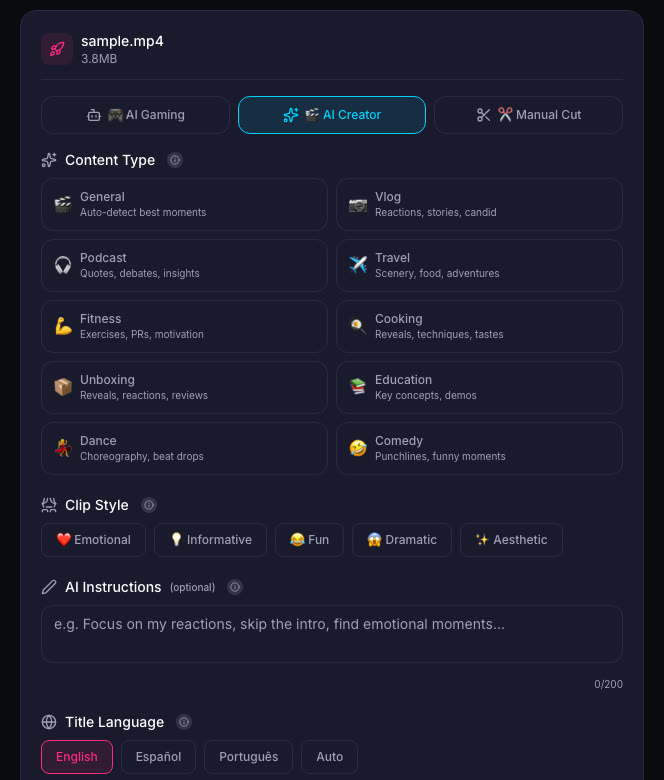
If the stream goes well and you want to clip it, download the VOD and upload it to ViceForge. Choose AI Creator for talk and IRL videos. Upload your footage and let the tool identify strong moments and add captions.
Be mindful of privacy: avoid including identifiable faces of staff or customers who did not agree to be on camera.
Quick checklist
- Ask the restaurant if streaming is allowed.
- Tell staff you are streaming and viewers might interfere.
- Never show QR codes, receipts, table numbers, or order screens.
- Angle the camera so ordering systems are out of frame.
- If viewers place fake orders, tell staff immediately.
- Do not lie or exaggerate what happened.
Sources
Written with AI assistance, then fact-checked and edited by Predrag Mitrovic.
Turn your next stream into Shorts
Upload a VOD or gameplay recording and ViceForge finds the best moments, cuts vertical clips and adds captions.
Clip a video with ViceForgeMore from Guides
YouTube Report: 72% of Creators Use AI Video, Here's What It Means
YouTube's new report shows 72% of surveyed video posters use AI on videos or images. Here's how AI fits into your clip workflow.
YouTube Tests Video Deletion to Save Channels from Spam Bans
YouTube is testing a 30-day grace period for spam violations. Eligible creators can delete videos to avoid permanent termination.
YouTube Restores True Crime Channel After Demonetization
YouTube reversed its demonetization of popular true crime channel Explore With Us (EWU), following public support from fans and a review by YouTube's teams. The channel, which produces documentaries...