GTA 6 Copyright Claims: Frank El Santo Responds to YouTuber Backlash
Colombian artist Frank El Santo apologised after his GTA 6 gameplay in Content ID flagged other creators' videos. Here's what happened and how to protect your clips.
Colombian reggaeton artist Frank El Santo has responded after YouTubers reported copyright claims on their GTA 6 videos. The claims came from El Santo's own gameplay footage being registered in YouTube's Content ID system, causing it to flag other creators' GTA 6 videos as matches. Here's what happened, what it means for your clips, and how to protect your channel.
What happened with Frank El Santo's GTA 6 claims
Frank El Santo (real name Andrés Arango Flórez) uploaded his own GTA 6 gameplay to YouTube and registered it with Content ID, YouTube's automated copyright detection system. When other creators uploaded their GTA 6 videos, Content ID matched parts of their gameplay to El Santo's footage and flagged them as copyright violations.
YouTubers including theRadBrad, HollowPoiint, machodgdon and DarkViperAU reported claims on their videos. DarkViperAU posted a screenshot showing El Santo's name on the claim and asked him to fix it.
Some creators claimed El Santo had done it deliberately and was "laughing about it" in comments where he was tagged. El Santo responded in the comments of one of his videos, according to Polygon, saying he did not file the claims manually and does not own any rights to GTA 6. He urged creators to dispute the claims and apologised for the trouble.
Why this is different from music copyright
GTA 6 has a streamer mode that mutes licensed music from the in-game radio, which prevents copyright claims from music owners. But this situation is not about music. It is about gameplay footage itself being registered in Content ID.
The Content ID system matched El Santo's gameplay to other players' footage, even though both were original recordings of the same game.
What to do if you get a claim on your GTA 6 video
Check the claim details in YouTube Studio under Content > video > Restrictions. If the claim is from another player's gameplay footage and not from Rockstar or a music owner, dispute it.
YouTube's dispute process lets you tell the claimant why the claim is wrong. If the claimant does not respond or releases the claim, the video is cleared. If they uphold it, you can appeal.
A copyright claim (Content ID match) does not give you a strike. It can block the video, mute it, or redirect ad revenue to the claimant. A copyright strike is a manual takedown notice from the copyright owner and counts against your channel.
How to avoid claims on your GTA 6 clips
- Turn on streamer mode in GTA 6's audio settings to mute licensed radio music. This stops music claims but does not affect gameplay claims like the El Santo situation.
- Dispute wrong claims fast. If your own gameplay is claimed by another player's footage, dispute it. Do not leave it.
- Check your video's status in YouTube Studio after upload. Claims appear within hours or days.
Quick checklist for GTA 6 copyright protection
- Turn on streamer mode in GTA 6 audio settings.
- Check YouTube Studio after every upload for claims.
- Dispute claims that come from other players' gameplay, not from Rockstar or music owners.
- Keep your own recordings of your streams and gameplay in case you need proof.
- Do not use music from outside the game in your clips unless you have the rights.
Turn your GTA 6 gameplay into clips
If you have hours of GTA 6 footage and want to turn it into clips fast, upload it to ViceForge. Pick AI Gaming, choose GTA from the game list, and get vertical clips with captions. The AI finds action, kills, chases, crashes and big reactions. MP4, MOV, AVI and WebM are supported.
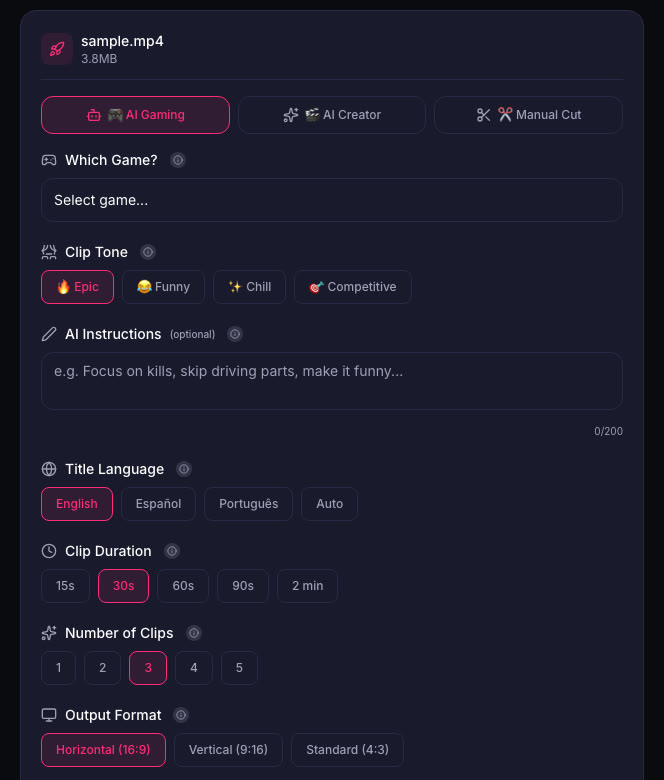
Every clip keeps the original audio from your recording, including any music that was in the game. If you used streamer mode, the clip has no licensed music. If you did not, the clip can still be claimed by music owners on YouTube.
Sources
Written with AI assistance, then fact-checked and edited by Predrag Mitrovic.
Turn your next stream into Shorts
Upload a VOD or gameplay recording and ViceForge finds the best moments, cuts vertical clips and adds captions.
Clip a video with ViceForgeMore from Guides
AI Voice Scams and Your Channel: What Creators Must Know
A Florida man got 47 months in prison for cloning Kick streamer N3on's voice and stealing $260,000. Here's how to protect your channel.
Small Streamer in Tears After Ibai Sends Thousands to His GTA 6 Stream
A shoutout from mega-streamer Ibai Llanos sent thousands of viewers to a small GTA 6 streamer with zero audience, leaving him in tears. Here is what happened, and how to prepare your channel if a big...
Captions on Gaming Clips: Which Style Fits Your Moment
ViceForge has 15 caption styles. Bold for kills, Minimal for reactions, Clean for talk. Here's which style fits your clip and how to pick it.