Captions on Gaming Clips: Which Style Fits Your Moment
ViceForge has 15 caption styles. Bold for kills, Minimal for reactions, Clean for talk. Here's which style fits your clip and how to pick it.
Captions keep viewers engaged. But the style you pick changes how people read your moment. ViceForge adds captions to every clip automatically, and the style you choose tells viewers what kind of clip they are watching.
Why caption style matters
A kill needs different text than a fail. Bold, uppercase captions work for hype and clutch plays. Minimal, lowercase styles fit chill moments and reactions. The wrong style makes a good clip feel off.
ViceForge has 15 caption styles. Free accounts get 2 (Classic and Bold). Paid plans unlock all 15. Here is what each style does best.
Caption styles for kills and action
Bold: Uppercase, thick text, high contrast. Best for kills, clutches, last-second wins. The text hits as hard as the moment.
Neon: Bright outline, glowing edges. Works for fast action, chases, explosions. Stands out over busy backgrounds.
Gamer: Blocky, angular letters. Built for competitive clips, ranked plays, tournament moments.
Heavy: Extra thick, no outline. Use it when the background is clean and the moment is huge.
Pop: Text bounces in. Good for surprise kills, unexpected plays, funny timing.
Caption styles for reactions and fails
Classic: Simple, readable, lowercase. The default for most clips. Works everywhere.
Minimal: Thin, small, unobtrusive. Best for reactions where the face tells the story and the text should stay out of the way.
Clean: Smooth, modern, no effects. Fits talk clips, commentary, podcast-style moments.
Two Lines: Splits long sentences across two lines. Easier to read when someone talks fast or says a lot at once.
Typewriter: Text appears letter by letter. Adds tension to a build-up or a slow reveal.
Caption styles for hype and viral moments
Animated: Text slides in with motion. Use it for hype moments, big announcements, stream milestones.
Glow: Soft light around the text. Works for emotional moments, wholesome clips, community highlights.
Comic: Bold outline, comic book style. Best for funny moments, memes, over-the-top reactions.
Retro: Pixelated, old-school look. Fits retro games, throwback clips, nostalgia content.
Highlight: Yellow background behind the text. Draws attention to a specific line or quote.
Quick style checklist
| Moment | Style |
|---|---|
| Kill, clutch, win | Bold, Neon, Gamer, Heavy |
| Reaction, fail, surprise | Classic, Minimal, Pop |
| Talk, commentary, podcast | Clean, Two Lines, Minimal |
| Hype, viral, meme | Animated, Comic, Glow |
| Retro game, throwback | Retro |
| Quote, key line | Highlight, Typewriter |
How to pick a style in ViceForge
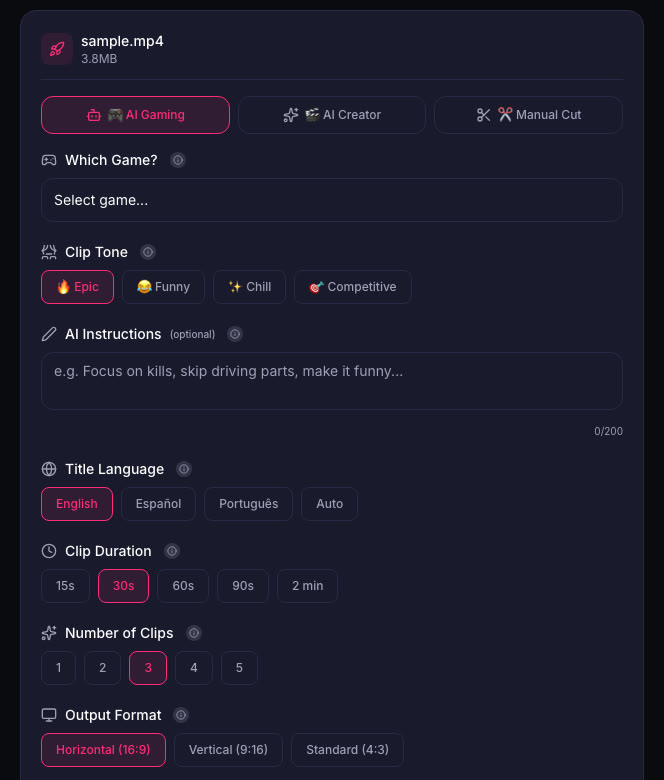
- Go to ViceForge upload.
- Pick your video.
- Choose AI Gaming or AI Creator.
- Scroll to Caption Style in the settings.
- Pick the style that fits your moment.
Which plans unlock all styles
| Plan | Caption styles |
|---|---|
| Free | Classic, Bold |
| Gamer Pro | All 15 |
| Creator Pro | All 15 |
| Creator Elite | All 15 |
Free accounts can test Bold and Classic. If you need Neon, Gamer or any other style, upgrade to a paid plan. All paid plans unlock the full set.
One style per video, not per clip
ViceForge applies the caption style to the whole video when you upload. If you want different styles for different moments, upload the video twice with different settings. One upload with Bold for kills, another with Minimal for reactions.
Captions in vertical clips
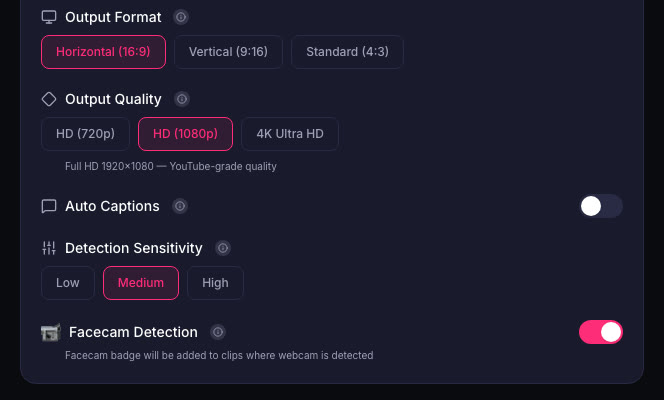
Every ViceForge clip comes out in the format you choose: Horizontal (16:9), Vertical (9:16) or Standard (4:3). Captions appear in all three. In vertical clips, captions sit at the bottom, above the progress bar, and stay readable over the facecam when Facecam Detection is on.
Test styles on short clips first
If you are not sure which style fits, upload a short test video (under 5 minutes) on the Free plan. Generate clips with Classic and Bold, see which one works, then upgrade and upload the full stream with the style you picked.
Sources
Written with AI assistance, then fact-checked and edited by Predrag Mitrovic.
Turn your next stream into Shorts
Upload a VOD or gameplay recording and ViceForge finds the best moments, cuts vertical clips and adds captions.
Clip a video with ViceForgeMore from Guides
Small Streamer in Tears After Ibai Sends Thousands to His GTA 6 Stream
A shoutout from mega-streamer Ibai Llanos sent thousands of viewers to a small GTA 6 streamer with zero audience, leaving him in tears. Here is what happened, and how to prepare your channel if a big...
Instagram's Amazon Affiliate Links: What Creators Should Know
Instagram now lets creators link directly to Amazon products. Some influencers are skeptical about earnings and what they are agreeing to.
Instagram Stories Now Editable: Keep Views, Likes, Replies
Instagram now lets you edit Stories after posting. Fix typos, swap stickers or change music for 15 minutes without losing views, likes or replies.