Report: GTA 6 Sick Days Could Cost US $1 Billion, Plan Your Launch Week
An economist estimates 1.5 million US workers may call in sick on November 19 when GTA 6 launches. Here is how to plan your schedule without burning out.
An estimated 1.5 million US workers plan to call in sick on November 19, 2026, the day GTA 6 launches. These are estimates, not confirmed numbers. Many creators see launch week as a major content opportunity. Here is how to plan your schedule without burning out.
What the numbers say
One car company has already announced it will pause operations on that date because many employees had already informed them they would be off.
The report notes that even workers who do show up may be distracted, talking about GTA 6 or staying up late to play it. Distracted workers may spend more time online looking for content.
Why this matters for creators
If you plan to stream or clip heavily, you need a strategy that keeps you online without exhausting yourself.
1. Decide your hours now. Will you stream the first 12 hours, or spread your sessions across three days? Consider whether you want to go for early clips with a marathon stream, or spread sessions across a week for more chances to catch trending moments.
2. Plan your clip schedule. Record your gameplay sessions and consider how many clips you want to create. Posting them all at once floods your channel. Spread them across the week instead.
3. Set a cutoff time. Streaming until you collapse makes bad content. Pick a time to stop, even if the game is still fun.
4. Batch your editing. Record your sessions, then cut clips in one sitting. ViceForge can help you turn a full recording into ranked clips quickly, so you spend less time editing and more time playing or resting.
Quick checklist for launch week
- Block time off work or clear your schedule for November 19 to 21
- Set your stream schedule and post it in advance
- Prepare your capture setup: PS5 or Xbox settings, capture card if you use one
- Plan your clip posting schedule: how many per day, which platforms first
- Set a daily cutoff time and stick to it
- Batch your editing: record long, cut clips in one session
- Keep a list of moments to clip: funny lines, crashes, first missions, NPC reactions
Cutting clips without the grind
When you have hours of footage, finding the best moments takes time. ViceForge can help you identify action, kills, chases, crashes and big reactions, then organize them so you can review and choose what to post. You can adjust the length, captions and format before downloading.
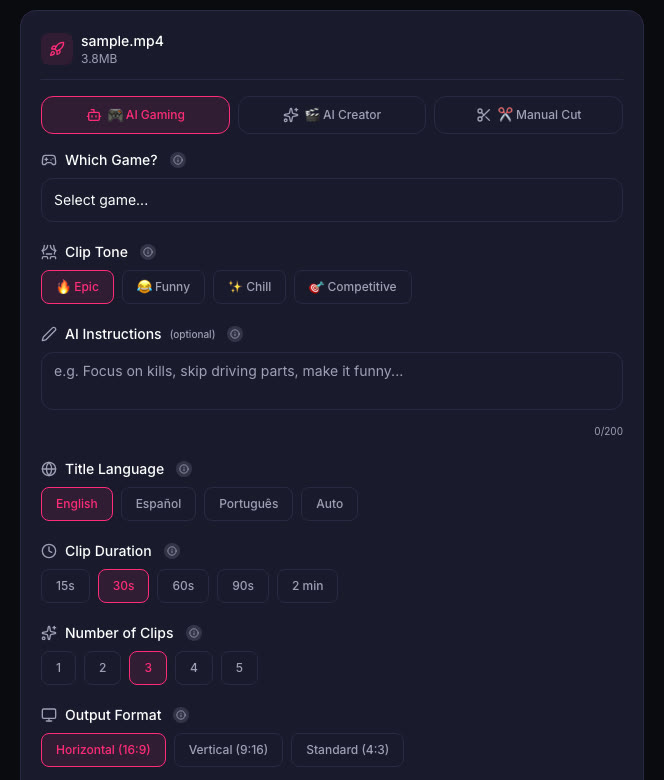
The GTA game profile works for GTA 6 recordings. You upload your video, pick the game, choose your clip length and format, and the AI finds the moments. Clips can include captions and keep your facecam in frame if you stream with one.
What Rockstar says
Rockstar's policy allows occasional, non-commercial use of its games in videos, asks creators not to post isolated cutscenes or leaked material, and keeps the right to remove content. It does not spell out monetization of GTA 6 videos. See Can You Monetize GTA 6 Clips on YouTube?.
Sources
Written with AI assistance, then fact-checked and edited by Predrag Mitrovic.
Turn your next stream into Shorts
Upload a VOD or gameplay recording and ViceForge finds the best moments, cuts vertical clips and adds captions.
Clip a video with ViceForgeMore from GTA 6 News
GTA 6 TV Ad Cuts Shower Scenes, Extends Other Shots
Rockstar's first TV commercial for GTA 6 aired on October 20, 2026 during NBA games on NBC Sports. The 90-second ad is the launch trailer with three shower scenes removed. Other shots run a few...
GTA 6 Launch Trailer: What Streamers Missed
Here is what the trailer shows and how to capture those moments for your audience.

GTA 6 Hidden Details: What Devs Added That Even Rockstar Missed
Rockstar gave GTA 6 developers freedom to add features on their own. Not even studio heads know everything in the game. Here's how to find the details first.