Burger Shot Opens in Miami: What Streamers Should Clip
A real-life Burger Shot has opened at the Kaseya Center in Miami, where the Miami Heat play. For streamers, this is a rare chance to clip real-world footage of an in-game brand and cross-promote with...
A real-life Burger Shot has opened at the Kaseya Center in Miami, where the Miami Heat play. For streamers, this is a rare chance to clip real-world footage of an in-game brand and cross-promote with gameplay content.
What is happening in Miami
The Kaseya Center has rebranded one of its burger restaurants as Burger Shot. The Burger Shot restaurant is one part of Rockstar's Miami takeover. The company installed a $975,000 neon sign reading "Welcome to Vice City" on top of the Kaseya Center, and fans have spotted GTA-branded sports cars driving around Miami with camera crews. On November 18, the Miami Heat will play as the Vice City Heat on a GTA 6-themed court with custom jerseys.
Why this matters for streamers
1. IRL content before launch. Film the Burger Shot restaurant, the neon sign or the Vice City court and use it as launch-week content. You can post it as a Short or Reel with a line like "Burger Shot is real now" and tag it with GTA 6.
2. Side-by-side clips after launch. Create split-screen or before-and-after comparisons for Shorts.
3. Commentary over the footage. Talk about what Rockstar is doing in Miami, compare the real Burger Shot to the in-game version, or react to the Vice City Heat game. Your voice makes it your content.
4. Cross-promotion with gameplay. Post the IRL clip first to build hype, then follow it with a gameplay clip from the same location in the game. Link them in your description or pin a comment.
How to clip the footage
If you film the Burger Shot restaurant or the Vice City court, keep clips short. Film horizontally if you want to use the footage in a longer video later, or vertically if you are posting it as a Short right away. ViceForge can reformat horizontal footage to vertical (9:16) if you change your mind.
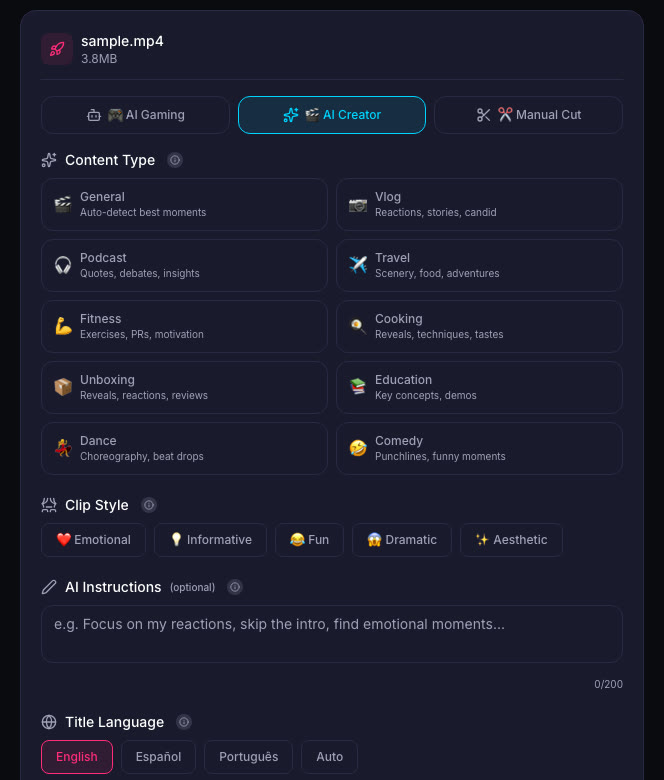
When you upload the footage to ViceForge, pick AI Creator mode. It is built for talk, IRL and commentary videos. Set the clip length to 30 or 60 seconds, and the AI will find the best moments from your footage. You can edit or remove any clip before downloading.
What to avoid
Do not film other people without permission. If someone is in your shot, ask first or blur their face in post.
Do not claim the menu is themed. The IGN report says it is unclear if the menu will feature in-game items. Film what you see, but do not invent details.
Do not post leaked material or content that violates Rockstar's video policy. Rockstar asks creators not to post leaked content, isolated cutscenes, or material that is not occasional and non-commercial. Stick to what Rockstar has shown or what is publicly visible in Miami.
Quick checklist
- Film the Burger Shot restaurant, the Vice City sign or the themed court if you are in Miami.
- Keep clips short for Shorts and Reels.
- Add your commentary or reaction over the footage.
- Upload to ViceForge in AI Creator mode to find the best moments.
- Post the IRL clip first, then follow it with gameplay from the same location after November 19.
- Tag your clips with GTA 6 and Vice City on YouTube, TikTok or Instagram.
What about the beer brands?
IGN also reports that Rockstar is planning to sell GTA 6 beer brands at bars in Miami, based on leaks. We covered that in Report: GTA 6 Beer Brands Found in US Database, May Hit Stores. If those beers appear, the same clipping strategy applies: film them, talk about them, and pair the footage with gameplay.
Sources
Written with AI assistance, then fact-checked and edited by Predrag Mitrovic.
Turn your next stream into Shorts
Upload a VOD or gameplay recording and ViceForge finds the best moments, cuts vertical clips and adds captions.
Clip a video with ViceForgeMore from GTA 6 News
GTA 6 Launch Trailer: What Streamers Missed
Here is what the trailer shows and how to capture those moments for your audience.
GTA 6 Hidden Details: What Devs Added That Even Rockstar Missed
Rockstar gave GTA 6 developers freedom to add features on their own. Not even studio heads know everything in the game. Here's how to find the details first.
PS App Auto-Upload for GTA 6: What Actually Works
PS5's auto-upload feature works for videos under 3 minutes and 1080p or lower. Here is what auto-uploads, what does not, and how to set it up.