GTA 6's Criminal Profile System: Pick Your Playstyle
GTA 6 tracks your actions from Professional to Irredeemable. Plan different playthroughs and clip contrasting criminal styles for variety.
GTA 6 tracks your actions through a Criminal Profile system that runs from "Professional" to "Irredeemable". The system affects how the story unfolds. Streamers and clip creators will be able to plan different playthroughs and highlight contrasting criminal styles for variety.
How the Criminal Profile works
The Criminal Profile tracks Jason and Lucia's behaviour on a scale marked by angel and devil icons. According to Rob Nelson, Rockstar North's co-studio head and head of development, the system gives players authority over how the world reacts to them.
The scale measures how much violence you use and how you handle situations. A professional criminal might incapacitate enemies instead of killing them, intimidate or bribe their way through a problem, or try to extract information without violence. An irredeemable criminal shoots first and asks questions later.
Small acts of kindness can shift the scale. Putting litter in a bin or feeding birds in the park counts. The system does not push you to follow traffic laws or avoid all violence, but it tracks consistent patterns.
What it affects
Your Criminal Profile influences how the story plays out. Nelson confirmed that consistent actions have an impact on how the world reacts to you and how the narrative unfolds. Rockstar has not detailed which story moments change or how the profile alters the narrative.
The system is not about right or wrong. Nelson explained that there is no single correct way to play, but your choices have consequences.
What it means for streamers and clip creators
The Criminal Profile opens up different content angles. You can run a professional playthrough where you avoid unnecessary kills, then switch to a chaotic run where you escalate every situation. Each style produces different story moments and different reactions from NPCs.
For clips, the contrast is the hook. A professional heist where you talk your way out of a corner plays differently from a shootout. Viewers who saw your first playthrough will want to see how the other extreme changes the story.
You can also theme a series around one profile. A "professional only" run or an "irredeemable chaos" run gives you a clear angle for titles, thumbnails and commentary.
Planning your first playthrough
Pick your angle before you start. If you want to see the professional side first, commit to it and clip the moments where restraint pays off. If you want chaos, lean into it and clip the escalations.
The system tracks consistent actions, so a clear commitment to one style will likely produce stronger reactions from the world. Save the opposite style for a second run.
When you clip, focus on the decision points. Those moments show your playstyle and set up the payoff later.
Cutting clips from different profiles
When you upload GTA 6 footage to ViceForge, the AI picks action, kills, chases and big reactions. A professional playthrough has fewer kills but more tense standoffs and negotiations. An irredeemable run has more shootouts and explosions.
Pick the AI Gaming mode, choose GTA from the game list, and set the clip tone and length. The AI finds the peaks in your footage, whether that is a clean escape or a full-scale gunfight.
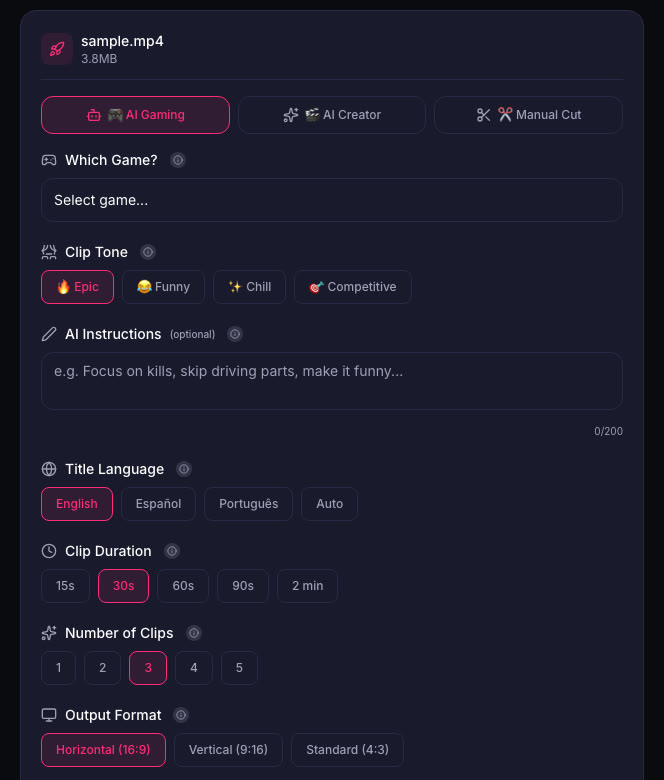
For talk or commentary videos where you explain your choices, use AI Creator mode. The AI listens to what you say and picks moments where you react to the consequences of your profile.
Quick checklist
- Pick your Criminal Profile angle before you start: professional, irredeemable, or a specific theme.
- Lean into consistent actions to see how the system responds to your playstyle.
- Clip the decision points where you choose restraint or escalation.
- Plan a second playthrough with the opposite profile for contrast.
- Use AI Gaming mode for action clips, AI Creator mode for commentary on your choices.
- Title your clips and videos to show the profile: "Professional Heist" vs "Irredeemable Chaos".
Sources
Written with AI assistance, then fact-checked and edited by Predrag Mitrovic.
Turn your next stream into Shorts
Upload a VOD or gameplay recording and ViceForge finds the best moments, cuts vertical clips and adds captions.
Clip a video with ViceForgeMore from GTA 6 News
Report: Rockstar, Travis Scott and Nike Team Up for $130 GTA 6 Sneakers
A reported collaboration between Rockstar, Travis Scott and Nike could bring three Air Force 1 sneakers themed around GTA 6 in November 2026.
GTA 6's Slower World: Why Rockstar Changed the Pacing
Rockstar tested GTA 6 with GTA 5's timings and found everything felt too fast. The leap in visual detail forced the studio to slow down the world.
GTA 6 Original Score Drops December 11: Pre-Order Now
Rockstar's official GTA 6 Original Score by Justice is available to pre-order now on CD, vinyl and streaming. The three-hour compilation releases December 11, 2026, nearly a month after the game...